
What Is Data Enrichment? (And Does Your CRM Need It?)
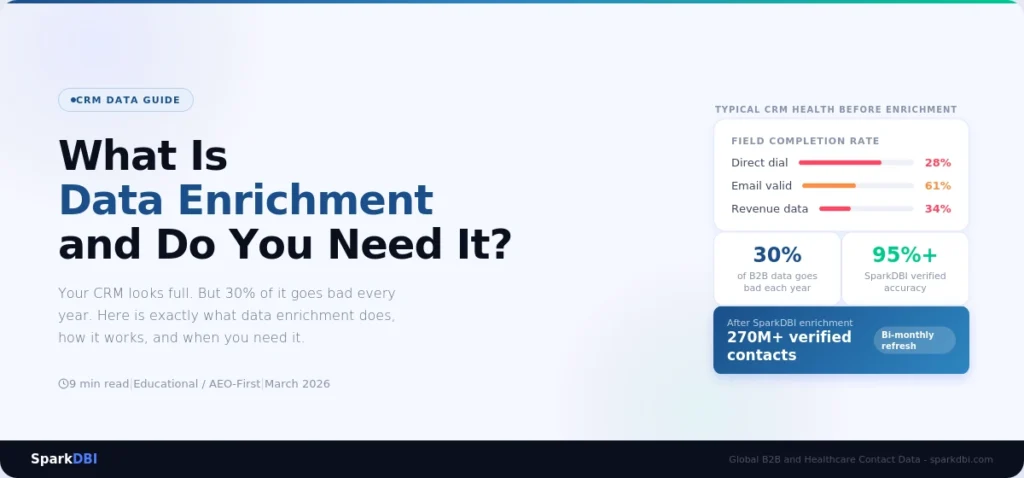
Your sales team is calling people who left their jobs six months ago. Your nurture sequences are firing at contacts whose email addresses bounced 90 days ago. And nobody flagged it — because your CRM looks full. So do you need data Enrichment?
What Is Data Enrichment? (And Does Your CRM Need It?)
9 min read | Last updated: March 2026
What is data enrichment? Data enrichment is the process of updating, completing, and appending missing information to contact records already in your CRM or marketing database. It corrects outdated email addresses, fills in missing fields like direct dial numbers and job titles, and adds firmographic data such as company size, revenue, and industry classification to incomplete records.
Most CRMs need it. B2B contact data decays at roughly 22-30% per year — meaning nearly a third of your database becomes inaccurate within 12 months. If your CRM is more than six months old and has not been enriched, the problem is already costing you pipeline.
This guide explains exactly what data enrichment is, how it works, what it costs, and how to know whether your CRM needs it right now.
What Is Data Enrichment?
Data enrichment means taking the contact and company records you already have and making them more complete, more accurate, and more useful.
Think of it this way: you have a contact in your CRM named James Chen, Director of Operations at a mid-size logistics company. But the record has no direct dial number, the email address is three years old, the company revenue field is blank, and his LinkedIn URL is missing. That record exists in your database but it’s barely usable. Enrichment fills in what’s missing and corrects what’s wrong — so James Chen becomes a fully workable lead rather than a half-built ghost record.
Data enrichment is distinct from buying a new contact list. Enrichment works on records you already own. It doesn’t add new contacts to your database — it upgrades the contacts you already have. The two processes complement each other, but they solve different problems.
For marketing and RevOps teams specifically, enrichment addresses three things at once: it improves the accuracy of existing records, it increases the completeness of fields used for segmentation and scoring, and it updates records that have become stale through natural B2B data decay.
Why your CRM might already be broken?
Here’s a number worth sitting with: B2B professionals change jobs at a rate that causes approximately 30% of contact database records to become outdated every year, according to Salesforce’s State of Sales research. That’s not a rounding error — that’s nearly one in three contacts becoming wrong within 12 months.
The problem compounds quietly. Each month that passes without enrichment, a slightly larger share of your database silently goes bad. Email addresses bounce. Job titles shift. People move to new companies. The CRM doesn’t flag any of this. It just keeps showing you a full database, and your team keeps working from it, not knowing which records are live and which are ghosts.
The downstream effects are real and measurable. High email bounce rates damage your sender reputation with inbox providers, making it harder to reach even the contacts whose addresses are valid. Outbound sequences built on bad data produce lower connect rates and worse reply rates — not because the messaging is wrong, but because the data underneath it is rotten. Sales reps waste time calling through stale contact lists when that time could be spent on qualified, reachable prospects. For more on how this compounds over time, see our guide on CRM data decay and how to measure it.
The hidden cost of doing nothing: Gartner estimates that poor data quality costs organisations an average of $12.9 million per year in wasted effort, missed opportunities, and incorrect decisions. For most B2B teams, this figure is abstract — until you calculate what one percentage point of improved contact reachability is worth across your outbound volume.
The dirty secret of most CRM data problems is that the CRM itself isn’t the issue. The issue is that nobody fed it accurate, refreshed data after the initial list import. Data enrichment is the fix for that specific problem.
What Data Enrichment Actually Does to Your Records
Enrichment operates at the field level — it looks at each record and determines what’s missing, what’s outdated, and what can be improved. Here’s what a full B2B data enrichment pass typically touches:
Email Address Validation and Update
The enrichment process checks whether existing email addresses are still active using inbox-level validation. Addresses that have gone inactive are flagged and, where a new address can be sourced and verified, replaced.
Direct Dial and Phone Number Append
Many CRM records captured through web forms include only a general company number or no phone at all. Enrichment appends verified direct dial numbers where available — critical for SDRs running outbound call sequences.
Job Title and Seniority Level Correction
Job titles change when people get promoted, restructure their roles, or move internally. Enrichment cross-references current role data and updates records where the title on file no longer matches the contact’s actual position.
Company Firmographic Data
Missing or wrong fields like company revenue, employee count, industry classification, and company headquarters location are populated or corrected. This data drives segmentation, lead scoring, and territory assignment in most RevOps setups.
LinkedIn URL and Social Profile Append
For sales teams running multi-channel outreach, having an accurate LinkedIn profile URL for every contact significantly improves personalisation and connection request acceptance rates.
Technology Stack and Intent Signals
Some enrichment services — including the SparkDBI data enrichment service — can append technographic data showing which software platforms a company currently uses. This is particularly valuable for outbound teams selling into the tech stack.
Not every enrichment pass covers all of these fields. The scope depends on the provider, the delivery format, and what your CRM setup supports. SparkDBI covers email, direct dial, firmographic, and technographic fields, delivered via CRM plugin, API, or flat-file depending on your integration preference.
Want to see what enrichment would actually change in your CRM?
SparkDBI can enrich a sample of your existing contacts and show you exactly what fields get updated — before you commit to anything.
See How SparkDBI Enriches Your CRM
Data Enrichment vs Data Cleansing: What’s the Difference?
These two terms get used interchangeably, but they describe different processes. Understanding the distinction matters because mixing them up leads to buying the wrong service.
Data cleansing (also called data cleaning or data scrubbing) is the process of identifying and removing bad data from your database. It finds duplicates, flags records with formatting errors, removes clearly invalid entries, and standardises inconsistent field values. Cleansing makes your data consistent and structured. But it doesn’t add anything new — it only removes or fixes what’s already there.
Data enrichment adds information that’s missing. It appends new fields, updates stale values with current ones, and increases the overall completeness and depth of each record.
| Process | What It Does | When to Use It |
|---|---|---|
| Data Cleansing | Removes duplicates, fixes formatting errors, deletes invalid records, standardises field values | Before enrichment — when your database has structural problems |
| Data Enrichment | Appends missing fields, updates stale values, increases record completeness and depth | After cleansing — when your records are clean but incomplete or outdated |
In practice, most CRM improvement projects need both. Cleansing first, enrichment second is the standard sequence. You clean the duplicates and errors, then enrich the cleaned records with updated and missing information. Running enrichment on a database full of duplicates is wasteful — you end up enriching the same contact twice and paying for the overlap.
SparkDBI’s enrichment service works on already-cleaned databases. If your CRM has not been through a deduplication and standardisation pass, that step should happen first.
How Does Data Enrichment Work in Practice?
The mechanics of enrichment vary by provider, but the core process follows a consistent pattern.
Step 1 – Match Your Existing Records Against the Enrichment Database
Your CRM records are matched against the provider’s verified contact database using multiple match keys — typically email address, full name plus company domain, or LinkedIn profile URL. Match rate is a critical quality metric: a good enrichment provider should achieve a 70%+ match rate on a clean, deduplicated CRM.
Step 2 – Identify Fields That Are Missing or Outdated
For each matched record, the enrichment system compares your existing field values against the provider’s current data. Fields that are blank get populated. Fields that appear stale — for example an email address that’s more than 18 months old — are flagged for potential update.
Step 3 – Validate Updates Before Writing to Your CRM
Reputable providers validate updated information before delivery. For email addresses, this means active inbox validation — confirming the address is currently receiving mail, not just syntactically correct. SparkDBI runs a combined AI-driven and human verification pass on all email updates before they are delivered.
Step 4 – Deliver Updates via Your Preferred Integration
Updates are delivered in whatever format fits your existing stack. SparkDBI supports direct CRM plugin integration with Salesforce, HubSpot, Zoho CRM, and Pipedrive. For teams without a native integration, flat-file delivery (CSV mapped to your field schema) and API delivery are both available.
Step 5 – Schedule Ongoing Refresh
A one-time enrichment pass solves today’s problem. But data continues to decay after enrichment. Scheduling a recurring enrichment cycle — quarterly at minimum, monthly for high-velocity outbound teams — keeps the database above the accuracy threshold needed for reliable outbound performance.
How does data enrichment work in Salesforce specifically? SparkDBI’s Salesforce integration maps directly to standard and custom objects, matching on contact and lead records and writing updates back to specified fields without overwriting values you have designated as protected. Setup typically takes under two hours for a standard Salesforce org.
What Does Data Enrichment Cost?
Pricing varies significantly across providers and models, but here is an honest breakdown of how B2B data enrichment is typically priced.
Per-Record Pricing
Some providers charge per record enriched, typically ranging from $0.05 to $0.50 per record depending on the fields covered and the quality tier. Per-record pricing works well for one-time or infrequent enrichment runs on a defined database size.
Subscription / Volume-Based Pricing
Most mid-market and enterprise providers use annual subscription pricing with a defined volume of records per month or per year. Pricing varies based on database size, refresh frequency, and field depth.
API Consumption-Based Pricing
Teams with large, dynamic databases often prefer API-based enrichment that runs in real time as new records enter the CRM. Pricing is typically per API call or per enriched field.
The more useful question is what enrichment costs relative to not enriching. Gartner estimates that poor data quality costs organisations an average of $12.9 million per year. For a sales team of 10 reps, even a 10% improvement in contact reachability translates to meaningful pipeline growth without adding headcount.
SparkDBI’s enrichment pricing is customised based on database size, field requirements, and delivery frequency. SparkDBI enriches a portion of your database at no cost so you can assess the quality and match rate before committing to a contract.
Signs Your CRM Needs Enrichment Right Now
Not sure whether your database has decayed to the point where enrichment is worth acting on? Here are the five signals that should prompt you to move.
Email bounce rates above 5%
A hard bounce rate above 5% is a reliable signal that a significant portion of your contact email addresses are no longer valid. Above 10%, you are at risk of sender reputation damage that will affect deliverability across your entire sending domain.
Sales reps reporting high rates of “left the company” responses
When SDRs regularly find that the person they’re calling no longer works at the company, that’s direct evidence of contact-level data decay. If this is a frequent complaint from your sales floor, it’s worth running a data audit before your next outbound push.
Low match rates on ABM campaigns
Account-based marketing depends on matching your target account list against advertising platforms like LinkedIn Campaign Manager. If your match rates are consistently below 60%, incomplete or inaccurate company and contact data is likely the cause.
More than six months since your last data refresh
At 30% annual decay, a six-month-old database has already lost roughly 15% of its accuracy. If the last time your CRM was refreshed was more than six months ago, enrichment is almost certainly overdue.
Missing critical fields in a majority of records
Pull a field completion report across your CRM. If more than 30% of contact records are missing direct dial, 50% are missing company revenue, or 40% are missing industry classification, enrichment will immediately improve your segmentation and scoring capability.
How SparkDBI Handles CRM Enrichment
SparkDBI is a global B2B and healthcare contact data provider with 270M+ verified contacts across 200+ countries. The SparkDBI data enrichment service is built on the same verified contact database used for new contact acquisition — which means enrichment updates are validated against the same 140+ licensed data partner sources and held to the same 95%+ accuracy standard.
Multi-Source Validation Before Delivery
Every updated field passes through multiple data source cross-references before being written to your CRM. A change to an email address must be confirmed by at least two independent sources and pass active inbox validation before it’s included in the enrichment output. This eliminates the false-positive updates that cheaper enrichment services produce — where a record gets “updated” with data that’s just as wrong as what it replaced.
Bi-Monthly Refresh Cycle
SparkDBI’s underlying contact database is refreshed every two months. For clients on a recurring enrichment plan, this means your CRM is always being updated against data that’s no more than eight weeks old — significantly fresher than the quarterly or semi-annual refresh cycles offered by most enterprise data providers.
Field-Level Control
SparkDBI’s CRM integrations support field-level enrichment rules. You can specify which fields should be updated, which should only be populated if blank, and which should be protected from any changes. This matters for teams that have manually verified certain records and do not want automated updates overwriting curated data.
Salesforce, HubSpot, Zoho, and Pipedrive Native Integrations
SparkDBI connects directly to the four most widely used B2B CRM platforms without requiring middleware or custom API development. For teams on other platforms, flat-file and API delivery handle the gap. The SparkDBI email enrichment service specifically handles email address append and validation — useful for databases where email is the primary gap rather than a full-field enrichment requirement.
Key Takeaways
Data enrichment is not a nice-to-have. For any B2B sales or marketing team running outbound programmes from a CRM that’s more than six months old, enrichment is what stands between you and a database full of silent failures. The core distinction: enrichment updates and completes records you already own. Cleansing removes bad data. Buying a list adds new contacts. The five signals that mean you should act now: bounce rates above 5%, high “left the company” feedback, ABM match rates below 60%, more than six months since your last refresh, and critical fields missing in over 30% of records.
Ready to see what your CRM looks like after enrichment?
SparkDBI enriches a sample of your existing contacts at no cost — so you can verify the accuracy and match rate before committing to a full run. No contract required.
Request 50 Free Enriched Sample Contacts
Frequently Asked Questions
What does data enrichment mean?
Data enrichment means adding missing information to or updating outdated information in your existing contact and company records. In a CRM context, this typically involves appending fields like direct dial numbers, verified email addresses, job titles, company revenue, and industry classification to records that were captured with incomplete data. The goal is to make each record more complete, more accurate, and more actionable for sales and marketing teams.
How does data enrichment work?
Data enrichment works by matching your existing CRM records against a verified external contact database using identifiers like email address, full name and company domain, or LinkedIn URL. For each matched record, missing fields are populated and stale values are updated using the provider’s current data. Good providers validate updates before delivery — particularly for email addresses, which should pass active inbox validation before being written back to your CRM. Delivery typically happens via CRM plugin, API integration, or flat-file export.
What is the difference between data enrichment and data cleansing?
Data cleansing removes bad data: it eliminates duplicates, standardises formatting, and deletes invalid records. Data enrichment adds missing data: it appends new fields and updates stale values on records that already exist. The two processes are complementary and typically run in sequence — cleanse first to remove duplicates and errors, then enrich to complete and update what remains. Running enrichment before cleansing wastes budget on duplicate records.
How much does data enrichment cost?
Data enrichment pricing varies by provider, volume, and field depth. Per-record pricing typically ranges from $0.05 to $0.50 depending on coverage. Subscription models are common for recurring enrichment at scale. The more useful cost comparison is against the cost of not enriching: Gartner estimates poor data quality costs organisations an average of $12.9 million annually. SparkDBI provides a no-cost sample enrichment run so you can assess quality and match rate before agreeing to any pricing.
What is email enrichment?
Email enrichment is a specific type of data enrichment focused on appending or updating email address fields in your CRM. It matches your existing contact records against a verified email database, identifies contacts where the email address is missing, invalid, or stale, and replaces or adds a verified active email address. Email enrichment is particularly valuable for databases built from event registrations, inbound form fills, or third-party list imports where email address quality is inconsistent. SparkDBI’s email enrichment service runs active inbox validation on every appended address before delivery.
How often should I run data enrichment on my CRM?
For most B2B teams, quarterly enrichment is the minimum. High-volume outbound teams should run monthly enrichment cycles to stay ahead of the 22-30% annual decay rate in B2B contact data. Teams using SparkDBI on a recurring plan benefit from bi-monthly database refreshes — meaning enrichment updates are always based on data no more than eight weeks old. The right frequency depends on your outbound volume, your industry’s job-change rate, and how quickly your campaigns rely on accurate contact data.
Written by the SparkDBI Revenue Data Team
Our contributors have 5+ years of hands-on experience in B2B demand generation, CRM operations, and go-to-market data strategy. SparkDBI works with 1,200+ sales, marketing, and revenue teams across global markets. All data claims in this article reflect SparkDBI’s verified dataset as of Q1 2026.
